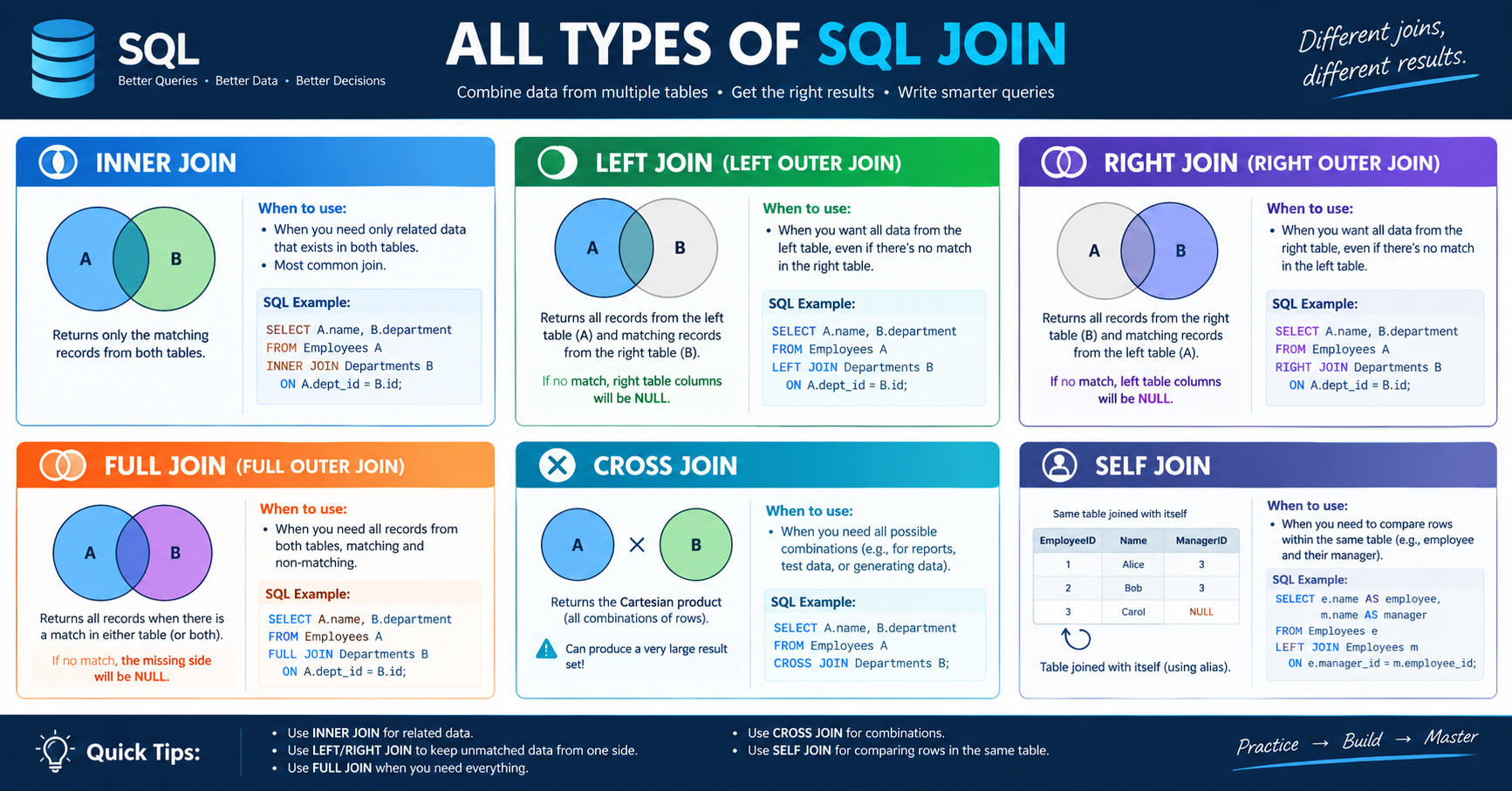
Learn JOINs step-by-step. No confusing theory. Just practical examples you can run right now.
📍 Quick Navigation
What Is a JOIN?
The Problem You're Solving
Your database has multiple tables. Each table stores one type of information.
Example:
Table 1: Student names and their class ID
Table 2: Class ID and class name
Question: "Which class is Alice in?"
Without JOIN: Can't answer! Alice's table only has a number (ClassID=10), not the class name.
With JOIN: Connect the two tables using ClassID → Get the complete answer.
That's It! That's What a JOIN Does
Student Table              Class Table
┌──────────┬────────┐     ┌────┬──────────┐
│ Name     │ Class# │     │ #  │ Name     │
├──────────┼────────┤     ├────┼──────────┤
│ Alice    │   10   │─────→  10│ Math     │
│ Bob      │   10   │─────→  10│ Math     │
│ Charlie  │   11   │─────→  11│ Science  │
└──────────┴────────┘     └────┴──────────┘
        ↓
    Answer: Alice is in Math!
Database Setup (Copy & Paste Ready)
Before practicing, run this to create sample tables:
-- DEPARTMENTS TABLE
CREATE TABLE Departments (
    DepartmentID INT PRIMARY KEY,
    DepartmentName VARCHAR(50)
);

INSERT INTO Departments VALUES
(1, 'Engineering'),
(2, 'Sales'),
(3, 'HR');

-- EMPLOYEES TABLE
CREATE TABLE Employees (
    EmployeeID INT PRIMARY KEY,
    Name VARCHAR(50),
    DepartmentID INT
);

INSERT INTO Employees VALUES
(1, 'Alice', 1),
(2, 'Bob', 2),
(3, 'Charlie', 1),
(4, 'Diana', 3),
(5, 'Eve', NULL);  -- No department assigned

-- SALARIES TABLE
CREATE TABLE Salaries (
    EmployeeID INT,
    Amount DECIMAL(10,2)
);

INSERT INTO Salaries VALUES
(1, 75000),
(1, 78000),  -- Alice got a raise!
(2, 65000),
(3, 72000),
(6, 90000);  -- Employee 6 doesn't exist!
Now you're ready to learn! ✅
THE 4 JOINs
JOIN #1: INNER JOIN (The Strict Matcher)
What Does It Do?
Shows ONLY rows where BOTH tables have matching data.
If it doesn't match in both tables → it disappears.
Quick Example
What we're asking: "Show me employees WITH their department names"
SELECT Employees.Name, Departments.DepartmentName
FROM Employees
INNER JOIN Departments ON Employees.DepartmentID = Departments.DepartmentID;
Result:
Name     │ DepartmentName
─────────┼────────────────
Alice    │ Engineering
Bob      │ Sales
Charlie  │ Engineering
Diana    │ HR

Note: Eve is MISSING (no DepartmentID match)
Why Eve Disappeared
Employees Table          Departments Table
Alice → 1    ✓           1 → Engineering
Bob → 2      ✓           2 → Sales
Charlie → 1  ✓           3 → HR
Diana → 3    ✓
Eve → NULL   ✗           MATCHES NOTHING → Eve doesn't appear!
INNER JOIN rule: If no match → row is excluded.
Quick Check ✅
Try this:
SELECT Employees.Name, Salaries.Amount
FROM Employees
INNER JOIN Salaries ON Employees.EmployeeID = Salaries.EmployeeID;
How many rows do you get? (Answer: 5 rows - notice employee 4 and 5 missing, but employee 1 appears twice!)
JOIN #2: LEFT JOIN (Keep Everything From Left)
What Does It Do?
Shows ALL rows from the LEFT table + matching data from the RIGHT table.
If no match on the right → show NULL (empty).
Quick Example
What we're asking: "Show me ALL employees and their departments (even if not assigned)"
SELECT Employees.Name, Departments.DepartmentName
FROM Employees
LEFT JOIN Departments ON Employees.DepartmentID = Departments.DepartmentID;
Result:
Name     │ DepartmentName
─────────┼────────────────
Alice    │ Engineering
Bob      │ Sales
Charlie  │ Engineering
Diana    │ HR
Eve      │ NULL           ← No department, but Eve still shows!
The Difference From INNER JOIN
INNER JOIN: Alice Bob Charlie Diana (Eve gone)
LEFT JOIN:  Alice Bob Charlie Diana Eve (all kept)
LEFT JOIN is like saying: "Show everyone, even if something is missing about them."
When to Use LEFT JOIN
Finding unmatched data ("Which employees have no salary records?")
Complete lists ("Show all employees and their optional manager")
Data audits ("What's missing?")
Quick Check ✅
Try this:
SELECT Employees.Name, Salaries.Amount
FROM Employees
LEFT JOIN Salaries ON Employees.EmployeeID = Salaries.EmployeeID;
How many rows now? (Answer: 6 rows - all employees appear, even without salaries)
JOIN #3: RIGHT JOIN (Keep Everything From Right)
What Does It Do?
Shows ALL rows from the RIGHT table + matching data from the LEFT table.
It's the mirror of LEFT JOIN.
Quick Example
SELECT Employees.Name, Salaries.Amount
FROM Employees
RIGHT JOIN Salaries ON Employees.EmployeeID = Salaries.EmployeeID;
Result:
Name     │ Amount
─────────┼────────
Alice    │ 75000
Alice    │ 78000
Bob      │ 65000
Charlie  │ 72000
(NULL)   │ 90000      ← Orphan record! Employee 6 doesn't exist
Honest Talk About RIGHT JOIN
Almost never use it. You can rewrite it as LEFT by flipping the tables:
Instead of:
FROM Employees RIGHT JOIN Salaries
Write:
FROM Salaries LEFT JOIN Employees ← Easier to read!
Same result, clearer code. 👍
JOIN #4: FULL OUTER JOIN (Show Everything)
What Does It Do?
Shows ALL rows from BOTH tables.
Matching rows show both sides
Unmatched left rows show with NULL on right
Unmatched right rows show with NULL on left
Quick Example
SELECT Employees.Name, Salaries.Amount
FROM Employees
FULL OUTER JOIN Salaries ON Employees.EmployeeID = Salaries.EmployeeID;
Result:
Name     │ Amount
─────────┼────────
Alice    │ 75000
Alice    │ 78000
Bob      │ 65000
Charlie  │ 72000
Diana    │ NULL       ← Diana has no salary
Eve      │ NULL       ← Eve has no salary
(NULL)   │ 90000      ← Employee 6 orphan record
Important: MySQL Limitation ⚠️
MySQL doesn't support FULL OUTER JOIN!
If you use MySQL, use this workaround:
SELECT Employees.Name, Salaries.Amount
FROM Employees
LEFT JOIN Salaries ON Employees.EmployeeID = Salaries.EmployeeID

UNION

SELECT Employees.Name, Salaries.Amount
FROM Employees
RIGHT JOIN Salaries ON Employees.EmployeeID = Salaries.EmployeeID
WHERE Employees.EmployeeID IS NULL;
(PostgreSQL, SQL Server, SQLite support FULL OUTER directly)
Quick Comparison Table
When to use each JOIN:

INNER JOIN   → Only perfect matches
LEFT JOIN    → All from left + matches from right
RIGHT JOIN   → All from right + matches from left
FULL OUTER   → Everything from both tables
PRACTICE PROBLEMS
Problem 1: Basic INNER JOIN ⭐
What we need: Show each employee's name and salary amount.
SELECT Employees.Name, Salaries.Amount
FROM Employees
INNER JOIN Salaries ON Employees.EmployeeID = Salaries.EmployeeID
ORDER BY Employees.Name;
Expected Result:
Name     │ Amount
─────────┼────────
Alice    │ 75000
Alice    │ 78000
Bob      │ 65000
Charlie  │ 72000
Why this works: INNER JOIN only shows employees who have salary records. (Diana and Eve excluded because they have no salaries)
Problem 2: Find Missing Data With LEFT JOIN ⭐
What we need: Show all employees and their salary (if they have one). Highlight who's missing salary info.
SELECT Employees.Name, Salaries.Amount
FROM Employees
LEFT JOIN Salaries ON Employees.EmployeeID = Salaries.EmployeeID
ORDER BY Employees.Name;
Expected Result:
Name     │ Amount
─────────┼────────
Alice    │ 75000
Alice    │ 78000
Bob      │ 65000
Charlie  │ 72000
Diana    │ NULL       ← Has no salary record
Eve      │ NULL       ← Has no salary record
Why use LEFT? We want EVERYONE, even those without salaries. Shows the full employee list.
Problem 3: Joining 3 Tables ⭐⭐
What we need: Show employee name, their department, and their salary.
SELECT
    Employees.Name,
    Departments.DepartmentName,
    Salaries.Amount
FROM Employees
INNER JOIN Departments ON Employees.DepartmentID = Departments.DepartmentID
INNER JOIN Salaries ON Employees.EmployeeID = Salaries.EmployeeID;
Expected Result:
Name     │ DepartmentName │ Amount
─────────┼────────────────┼────────
Alice    │ Engineering    │ 75000
Alice    │ Engineering    │ 78000
Bob      │ Sales          │ 65000
Charlie  │ Engineering    │ 72000
How it works:
Start with Employees
Find their department (first JOIN)
Find their salary (second JOIN)
Note: Eve is missing (no department), Diana is missing (no salary)
Problem 4: Mixed Joins ⭐⭐
What we need: Show ALL employees (even without department) and their salary IF they have one.
SELECT
    Employees.Name,
    Departments.DepartmentName,
    Salaries.Amount
FROM Employees
LEFT JOIN Departments ON Employees.DepartmentID = Departments.DepartmentID
LEFT JOIN Salaries ON Employees.EmployeeID = Salaries.EmployeeID;
Expected Result:
Name     │ DepartmentName │ Amount
─────────┼────────────────┼────────
Alice    │ Engineering    │ 75000
Alice    │ Engineering    │ 78000
Bob      │ Sales          │ 65000
Charlie  │ Engineering    │ 72000
Diana    │ HR             │ NULL
Eve      │ NULL           │ NULL
Why this works: LEFT JOIN keeps everyone from the left table, no matter what.
REAL-WORLD EXAMPLES
Example 1: Customer Orders
Tables:
Customers: CustomerID, CustomerName
Orders: OrderID, CustomerID, OrderDate
Question: "Show me customer names with their orders"
SELECT Customers.CustomerName, Orders.OrderDate
FROM Customers
INNER JOIN Orders ON Customers.CustomerID = Orders.CustomerID
ORDER BY Customers.CustomerName;
Result: Only customers who have placed orders.
Example 2: Find Inactive Customers
Question: "Which customers have NEVER placed an order?"
SELECT Customers.CustomerName
FROM Customers
LEFT JOIN Orders ON Customers.CustomerID = Orders.CustomerID
WHERE Orders.OrderID IS NULL;
Key trick: WHERE Orders.OrderID IS NULL finds rows with no match.
Result: Shows customers with no orders.
Example 3: Count Orders Per Customer
Question: "How many orders did each customer place?"
SELECT
    Customers.CustomerName,
    COUNT(Orders.OrderID) as OrderCount
FROM Customers
LEFT JOIN Orders ON Customers.CustomerID = Orders.CustomerID
GROUP BY Customers.CustomerID, Customers.CustomerName
ORDER BY OrderCount DESC;
Result:
CustomerName │ OrderCount
─────────────┼────────────
Acme Corp    │ 3
TechStart    │ 2
Global Sys   │ 1
FastGrow     │ 0         ← Never ordered!
DEBUGGING JOINs
Problem: Too Many Rows!
What happened: One employee appears 10 times instead of once.
Cause: The right table has multiple matches.
Employees:          Salaries:
Alice (ID=1)  ───┬─→ $75000 (ID=1)
                 ├─→ $78000 (ID=1)
                 ├─→ $81000 (ID=1)

Result: Alice appears 3 times!
This is NORMAL! If someone has 3 salary records, they appear 3 times.
If you want only the latest salary:
SELECT Employees.Name, Salaries.Amount
FROM Employees
INNER JOIN Salaries ON Employees.EmployeeID = Salaries.EmployeeID
WHERE Salaries.EffectiveDate = (
    SELECT MAX(EffectiveDate) FROM Salaries
);
Problem: Missing Employees
What happened: Some employees don't appear in the result.
Cause: You used INNER JOIN, but those employees don't have matching data.
Example:
SELECT Employees.Name, Salaries.Amount
FROM Employees
INNER JOIN Salaries ...
-- Eve doesn't appear because she has no salary record
Fix: Change to LEFT JOIN if you want everyone:
SELECT Employees.Name, Salaries.Amount
FROM Employees
LEFT JOIN Salaries ...
-- Now Eve appears with NULL salary
Problem: NULL Values in Results
What happened: Some columns show NULL.
Cause: That's normal! It means the left table had data but the right table didn't.
Name     │ Department
─────────┼────────────
Eve      │ NULL       ← Eve has no department assigned
If you want to hide NULLs:
WHERE DepartmentName IS NOT NULL
If you want to replace NULLs with a default value:
SELECT Employees.Name,
       COALESCE(DepartmentName, 'No Department') as Department
FROM Employees
LEFT JOIN Departments ...
Problem: "Column Ambiguous" Error
What happened: Your query says which column but not which table.
-- ❌ ERROR: Which EmployeeID? Employees.EmployeeID or Salaries.EmployeeID?
FROM Employees
INNER JOIN Salaries ON EmployeeID = EmployeeID

-- ✅ FIX: Be specific
FROM Employees
INNER JOIN Salaries ON Employees.EmployeeID = Salaries.EmployeeID
Rule: Always use TableName.ColumnName in the ON clause.
Problem: Forgot the ON Clause
-- ❌ WRONG: No ON clause!
FROM Employees
INNER JOIN Salaries

-- Result: EVERY employee matched with EVERY salary!
-- Alice ($75000), Alice ($78000), Alice ($81000)...
-- Bob ($75000), Bob ($78000), Bob ($81000)...
-- Cartesian product = huge explosion of rows!

-- ✅ FIX: Add the ON clause
FROM Employees
INNER JOIN Salaries ON Employees.EmployeeID = Salaries.EmployeeID
Debugging Checklist
❓ Too many rows?
  → Right table has multiple matches (normal!)
  → Use GROUP BY or DISTINCT if you only want one per person

❓ Missing rows?
  → Change INNER JOIN to LEFT JOIN

❓ NULL values?
  → Normal with LEFT/RIGHT/FULL JOIN
  → Use WHERE IS NOT NULL to filter them

❓ Wrong data?
  → Check your ON condition
  → Make sure you're joining the right columns

❓ "Column ambiguous" error?
  → Use TableName.ColumnName everywhere

❓ "No ON clause" error?
  → Add: ON LeftTable.Column = RightTable.Column
ADVANCED TOPICS
CTEs: Making Complex Queries Readable
What's a CTE?
CTE = "Common Table Expression" = a temporary table you create and use once.
It makes messy queries readable by breaking them into steps.
Simple Example
Without CTE (hard to read):
SELECT AVG(Salary) FROM Employees
WHERE EmployeeID IN (
    SELECT EmployeeID FROM Salaries
    WHERE Amount > 70000
);
With CTE (clear intent):
WITH HighEarners AS (
    SELECT EmployeeID FROM Salaries WHERE Amount > 70000
)
SELECT AVG(Amount) FROM HighEarners;
Read it like:
First, create a temporary table
HighEarnersPut employees earning > 70000 in it
Then calculate the average
Practical Example
Problem: Show departments with total payroll AND employee count.
WITH DeptSalaries AS (
    -- Step 1: Get total salary per department
    SELECT
        Departments.DepartmentID,
        Departments.DepartmentName,
        SUM(Salaries.Amount) as TotalPayroll,
        COUNT(DISTINCT Employees.EmployeeID) as EmployeeCount
    FROM Departments
    LEFT JOIN Employees ON Departments.DepartmentID = Employees.DepartmentID
    LEFT JOIN Salaries ON Employees.EmployeeID = Salaries.EmployeeID
    GROUP BY Departments.DepartmentID, Departments.DepartmentName
)
-- Step 2: Use the result
SELECT * FROM DeptSalaries
ORDER BY TotalPayroll DESC;
Much clearer than writing it all in one query!
Window Functions: Keep Details + Compare
The Problem with GROUP BY
-- This loses individual details!
SELECT Department, AVG(Salary) as AvgSalary
FROM Employees
GROUP BY Department;

-- You see: Department | AvgSalary
-- You lose: Individual employee names and their exact salaries
The Solution: Window Functions
-- This keeps details AND adds comparisons!
SELECT
    Name,
    Salary,
    Department,
    AVG(Salary) OVER (PARTITION BY Department) as DeptAverage
FROM Employees;
Result:
Name    │ Salary │ Department │ DeptAverage
────────┼────────┼────────────┼─────────────
Alice   │ 78000  │ Eng        │ 75000       ← Still see Alice's detail
Charlie │ 72000  │ Eng        │ 75000       ← Can compare to dept avg
Bob     │ 65000  │ Sales      │ 65000
You see both individual data AND comparisons!
Simple Ranking Example
SELECT
    Name,
    Salary,
    RANK() OVER (ORDER BY Salary DESC) as OverallRank,
    RANK() OVER (PARTITION BY Department ORDER BY Salary DESC) as DeptRank
FROM Employees;
Result:
Name    │ Salary │ OverallRank │ DeptRank
────────┼────────┼─────────────┼──────────
Alice   │ 78000  │ 1           │ 1         ← Highest in company AND dept
Charlie │ 72000  │ 2           │ 2
Bob     │ 65000  │ 3           │ 1         ← Highest in Sales
Recursive CTEs: Handling Hierarchies
When to Use
Perfect for organizational trees:
Employee → Manager → Director → CEO
File → Folder → Parent Folder
Simple Example
Show who reports to who:
Employees Table:
ID | Name    | ManagerID
───┼─────────┼───────────
1  | Alice   | NULL      ← CEO (no manager)
2  | Bob     | 1         ← Reports to Alice
3  | Charlie | 1         ← Reports to Alice
6  | Frank   | 2         ← Reports to Bob
Query: Show the chain
WITH RECURSIVE OrgChart AS (
    -- PART 1: Start with CEO (no manager)
    SELECT ID, Name, ManagerID, 1 as Level
    FROM Employees
    WHERE ManagerID IS NULL

    UNION ALL

    -- PART 2: Add each employee under their manager
    SELECT
        e.ID, e.Name, e.ManagerID,
        oc.Level + 1
    FROM Employees e
    INNER JOIN OrgChart oc ON e.ManagerID = oc.ID
    WHERE oc.Level < 10  -- Prevent infinite loops
)
SELECT Name, Level FROM OrgChart
ORDER BY Level, Name;
Result:
Name     │ Level
─────────┼───────
Alice    │ 1        ← CEO
Bob      │ 2        ← Reports to Alice
Charlie  │ 2        ← Reports to Alice
Frank    │ 3        ← Reports to Bob
LEARNING PATH
Week 1: Get Comfortable
Day 1-2: Understand what JOINs are (school analogy)
Day 3-4: Master INNER JOIN (only matches)
Day 5-7: Master LEFT JOIN (all from left)
Test: Can you write simple 2-table JOINs?
Week 2: Build Confidence
Day 8-9: Practice RIGHT JOIN and FULL OUTER JOIN
Day 10-12: Join 3 tables together
Day 13-14: Real-world queries (customers + orders + products)
Test: Can you join multiple tables without confusion?
Week 3: Level Up
Day 15-17: Learn CTEs (make complex queries readable)
Day 18-19: Window functions (rank, compare, analyze)
Day 20-21: Recursive CTEs (hierarchies)
Test: Can you write queries with CTEs and window functions?
Week 4: Master & Build
Day 22-25: Performance optimization
Day 26-28: Build real projects with JOINs
Contribute to open source! 🚀
QUICK REFERENCE
JOIN Types at a Glance
| Join Type | Returns | Use When |
|---|---|---|
| INNER JOIN | Only matches | Want perfect matches only |
| LEFT JOIN | All from left | Want all from left + matches from right |
| RIGHT JOIN | All from right | Want all from right (avoid - use LEFT instead) |
| FULL OUTER | Everything | Want all from both tables |
Basic Syntax
SELECT column1, column2
FROM LeftTable
[JOIN_TYPE] RightTable
    ON LeftTable.ID = RightTable.ID;
Common Fixes
| Error | Solution |
|---|---|
| "Column ambiguous" | Use TableName.ColumnName |
| Too many rows | One table has multiple matches (normal!) |
| Missing rows | Try LEFT JOIN instead of INNER |
| NULL values | That's expected with LEFT/RIGHT/FULL JOIN |
| No ON clause | Add: ON Table1.ID = Table2.ID |
You've got this! 🎉
Last Updated: 2026 For: Complete beginners learning SQL Time to learn: 8-12 hours of practice.