Everything You Need to Know - All in One Place
🎯 TABLE OF CONTENTS
Quick Start (2-Minute Overview)
⚡ QUICK START (2-Minute Overview)
What is ORDER BY?
ORDER BY sorts (arranges) rows returned by a query. Nothing more.
SELECT * FROM employees ORDER BY salary DESC;
Two Main Types:
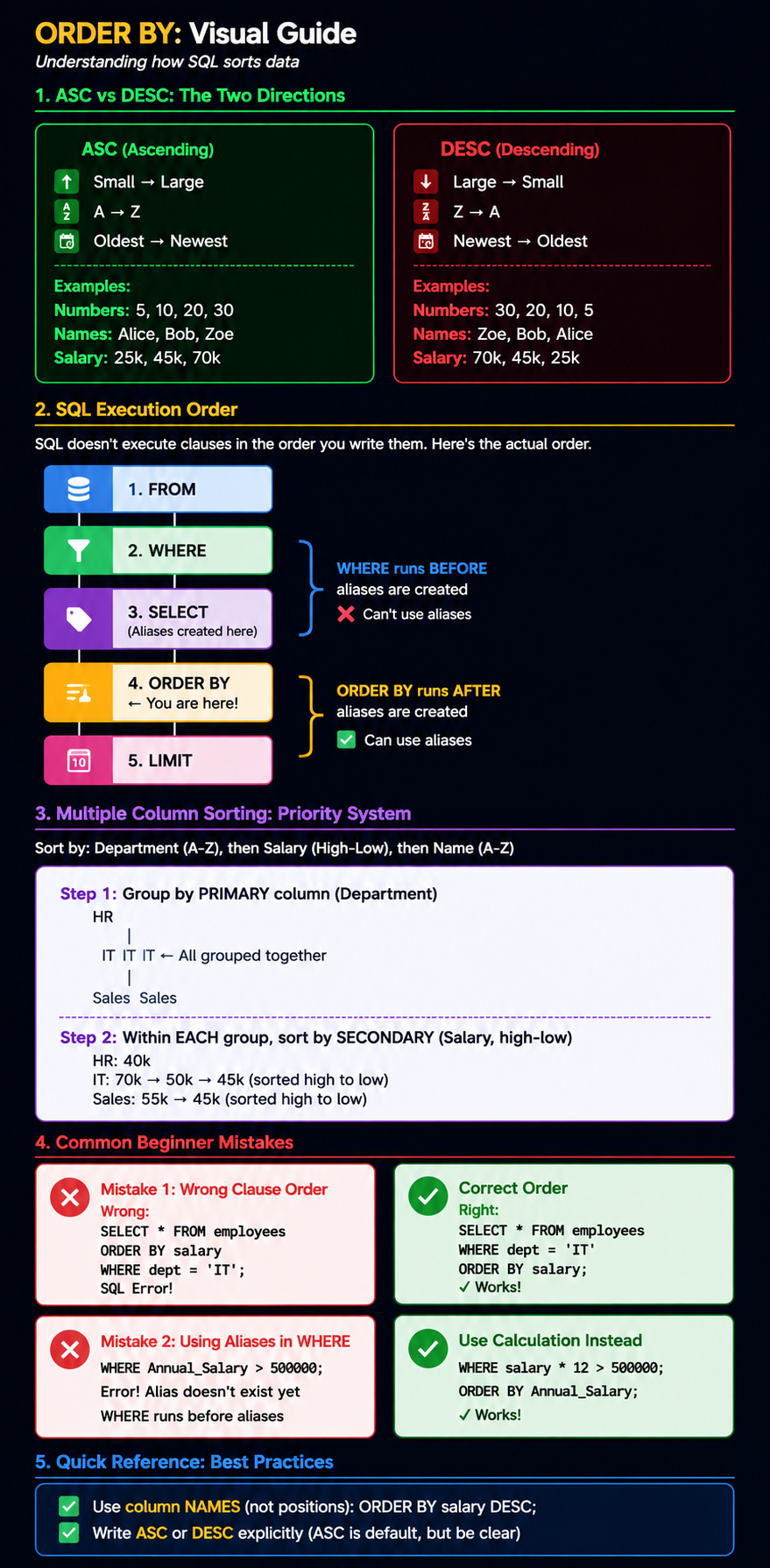
ASC = Small → Large (A → Z, 5 → 30) [DEFAULT]
DESC = Large → Small (Z → A, 30 → 5) [MUST WRITE EXPLICITLY]
Why It Matters:
Users see results in meaningful order
Data tells a story
Without it = random, confusing order
Critical Rule:
ORDER BY only changes HOW results are DISPLAYED.
It does NOT change the database.
Example:
-- Show employees, highest salary first
SELECT emp_name, salary
FROM employees
ORDER BY salary DESC;
Next: Want details? See Part 1: Foundations
📖 PART 1: FOUNDATIONS
What is ORDER BY?
Simple Definition: ORDER BY sorts the rows returned by a SQL query in a specific order.
Analogy: Think of sorting books on a shelf:
By title (alphabetically)
By author
By year published
By size
SQL does the same with data rows.
The Three Critical Facts
✅ Fact 1: ORDER BY Only Changes Display
Database Table (UNCHANGED)
│
├─ Rahul    50,000
├─ Aman     45,000
├─ Neha     70,000
├─ Priya    55,000
└─ Ravi     45,000

Query Result (SORTED)
│
├─ Neha     70,000  ← Displayed in different order
├─ Priya    55,000
├─ Rahul    50,000
├─ Aman     45,000
└─ Ravi     45,000

Database Table (STILL UNCHANGED - exactly same as before)
Remember: If you query again without ORDER BY, you get random order again. The data never changed!
✅ Fact 2: Syntax is Simple
SELECT column_name
FROM table_name
ORDER BY column_name;
Three parts:
SELECT - Which columns
FROM - Which table
ORDER BY - How to sort
✅ Fact 3: Default is Ascending (ASC)
ORDER BY salary;        ← Same as ORDER BY salary ASC;
ORDER BY salary ASC;    ← Explicit (better)
ORDER BY salary DESC;   ← Descending (must be explicit)
Why Do We Need ORDER BY?
Without ORDER BY:
❌ Random order (confusing)
❌ Hard to find specific items
❌ Data doesn't tell a story
❌ Users don't know what's most important
With ORDER BY:
✅ Clear, logical order
✅ Easy to find what matters most
✅ Data has meaning
✅ Users get the story
Example: E-commerce Product Listing
Without ORDER BY (random):
Product A - $50 - Rating 4.2 stars
Product Z - $15 - Rating 4.9 stars ← Best but hidden!
Product M - $100 - Rating 3.5 stars
Product B - $25 - Rating 4.7 stars

With ORDER BY rating DESC (best-rated first):
Product Z - $15 - Rating 4.9 stars ← Best visible!
Product B - $25 - Rating 4.7 stars
Product A - $50 - Rating 4.2 stars
Product M - $100 - Rating 3.5 stars
Better sorting = more sales!
📖 PART 2: CORE CONCEPTS - ASC vs DESC
Understanding ASC (Ascending)
Definition: Sorts from smallest to largest, A to Z, oldest to newest.
Visual Representation
ASC Direction (Going UP in value):

Salary:          Names:           Dates:
30,000           Alice            2020-01-01  ← Oldest
40,000           Bob              2021-06-15
50,000           Charlie          2022-12-25
60,000           David            2023-03-10
70,000           Eve              2024-07-30  ← Newest

Rule: Small → Large
SQL Example
SELECT emp_name, salary
FROM employees
ORDER BY salary ASC;
Output
emp_name    salary
Rahul       25,000  ← Lowest
Aman        35,000
Neha        50,000
Priya       70,000  ← Highest
When to Use ASC
✅ Ascending ages (youngest first)
✅ Alphabetical order (A → Z)
✅ Prices (cheapest first)
✅ Chronological (oldest first)
💡 Memory Trick
"A" in ASC rhymes with "Alphabet"
Alphabet: A → Z
ASC: Small → Large
Understanding DESC (Descending)
Definition: Sorts from largest to smallest, Z to A, newest to oldest.
Visual Representation
DESC Direction (Going DOWN in value):

Salary:          Names:           Dates:
70,000           Eve              2024-07-30  ← Newest
60,000           David            2023-03-10
50,000           Charlie          2022-12-25
40,000           Bob              2021-06-15
30,000           Alice            2020-01-01  ← Oldest

Rule: Large → Small
SQL Example
SELECT emp_name, salary
FROM employees
ORDER BY salary DESC;
Output
emp_name    salary
Priya       70,000  ← Highest
Neha        50,000
Aman        35,000
Rahul       25,000  ← Lowest
When to Use DESC
✅ Top salaries (highest first)
✅ Best ratings (5-stars first)
✅ Recent activity (newest first)
✅ Performance (best results first)
💡 Memory Trick
DESC = "Going DOWN"
Think: From mountain top ↓ to sea level
Z → A (reverse order)
Newest → Oldest (reverse time)
ASC vs DESC: Side-by-Side Comparison
Table Data (Original, Random Order)
Employee    Salary      Hire Date
Rahul       45,000      2020-03-15
Ravi        25,000      2022-02-14
Priya       70,000      2019-01-05
Amit        35,000      2021-06-20
With ORDER BY salary ASC (Lowest First)
SELECT * FROM employees ORDER BY salary ASC;
Employee    Salary      Hire Date
Ravi        25,000      2022-02-14  ← Lowest
Amit        35,000      2021-06-20
Rahul       45,000      2020-03-15
Priya       70,000      2019-01-05  ← Highest
With ORDER BY salary DESC (Highest First)
SELECT * FROM employees ORDER BY salary DESC;
Employee    Salary      Hire Date
Priya       70,000      2019-01-05  ← Highest
Rahul       45,000      2020-03-15
Amit        35,000      2021-06-20
Ravi        25,000      2022-02-14  ← Lowest
Key Difference
| ASC | DESC |
|---|---|
| Small → Large | Large → Small |
| A → Z | Z → A |
| Oldest → Newest | Newest → Oldest |
| Default (optional) | Must write explicitly |
ORDER BY salary; |
ORDER BY salary DESC; |
📖 PART 3: SQL EXECUTION ORDER (CRITICAL!)
Why This Matters
SQL doesn't execute clauses in the order you write them!
This is why:
❌ Aliases don't work in WHERE (they're created later)
✅ Aliases DO work in ORDER BY (they're created by then)
WHERE must run before ORDER BY (for filtering to work)
The Actual Execution Order
Your SQL (written order):
1. SELECT
2. FROM
3. WHERE
4. GROUP BY
5. ORDER BY

SQL's Actual Order (execution):
1️⃣  FROM        ← Get the table
    ↓
2️⃣  WHERE       ← Filter rows (❌ aliases don't exist yet!)
    ↓
3️⃣  GROUP BY    ← Group data
    ↓
4️⃣  HAVING      ← Filter groups
    ↓
5️⃣  SELECT      ← Choose columns (✅ aliases CREATED here!)
    ↓
6️⃣  ORDER BY    ← Sort results (✅ aliases now exist!)
    ↓
7️⃣  LIMIT       ← Return X rows
Visual Timeline
Execution Timeline:
┌─────────────────────────────────────────┐
│ FROM - Load employees table             │
└─────────────────────────────────────────┘
                    ↓
┌─────────────────────────────────────────┐
│ WHERE - Filter by department='IT'       │
│ ❌ Can't use aliases (not created yet)  │
└─────────────────────────────────────────┘
                    ↓
┌─────────────────────────────────────────┐
│ SELECT - Choose columns & create aliases│
│ ✅ salary * 12 AS Annual_Salary created │
└─────────────────────────────────────────┘
                    ↓
┌─────────────────────────────────────────┐
│ ORDER BY - Sort by aliases!             │
│ ✅ Can use Annual_Salary (now exists)   │
└─────────────────────────────────────────┘
                    ↓
┌─────────────────────────────────────────┐
│ LIMIT - Return first 10 rows            │
└─────────────────────────────────────────┘
This Creates an Important Rule
❌ WRONG: Using Alias in WHERE
SELECT salary * 12 AS Annual_Salary
FROM employees
WHERE Annual_Salary > 500000;  ← ERROR!
Why it fails: WHERE runs BEFORE aliases are created. Annual_Salary doesn't exist yet!
✅ RIGHT: Use Calculation in WHERE, Alias in ORDER BY
SELECT salary * 12 AS Annual_Salary
FROM employees
WHERE salary * 12 > 500000      ← Calculation (no alias)
ORDER BY Annual_Salary DESC;    ← Alias (exists now)
Why it works: WHERE uses raw calculation. ORDER BY uses alias (created in SELECT).
Remember This Phrase
WHERE comes BEFORE aliases
ORDER BY comes AFTER aliases

So:
WHERE → Use calculations directly
ORDER BY → Use aliases
📖 PART 4: SINGLE COLUMN SORTING
Basic Pattern
SELECT column_to_display
FROM table
ORDER BY column_to_sort [ASC|DESC];
Note: The column you sort by doesn't have to be displayed!
Example 1: Sort Employees by Name (Alphabetically)
Query:
SELECT emp_name, department, salary
FROM employees
ORDER BY emp_name;
Why this order?
Alphabetical (A → Z) is intuitive
Easy to find someone by name
Default ASC means A → Z
Output:
emp_name    department  salary
Aman        Sales       45,000
Ankit       IT          52,000
Neha        IT          70,000
Rahul       IT          50,000
Riya        HR          55,000
Vishal      Marketing   48,000
Example 2: Sort by Salary (Highest First)
Query:
SELECT emp_name, salary, department
FROM employees
ORDER BY salary DESC;
Why DESC?
Shows highest earners first
Managers want to see expensive resources
Business decision: who costs most?
Output:
emp_name    salary      department
Neha        70,000      IT          ← Highest
Riya        55,000      HR
Rahul       50,000      IT
Ankit       52,000      IT
Vishal      48,000      Marketing
Aman        45,000      Sales       ← Lowest
Example 3: Sort by Date (Newest First)
Query:
SELECT order_id, order_date, amount
FROM orders
ORDER BY order_date DESC;
Why DESC?
Recent orders first
Users want to see latest activity
Time moves forward (newest = most relevant)
Output:
order_id    order_date      amount
1006        2026-07-10      25,000  ← Newest
1005        2026-07-09      12,500
1004        2026-07-08      8,000
1003        2026-07-07      5,000
1002        2026-07-06      3,500   ← Oldest
Quick Decision Guide
What am I sorting?

Numbers (Salary, Age, Price, Count)
  ├─ Want highest first? → DESC
  └─ Want lowest first? → ASC

Text (Names, Cities, Products)
  ├─ Want A→Z? → ASC (default)
  └─ Want Z→A? → DESC

Dates (Created, Updated, Birth)
  ├─ Want newest first? → DESC
  └─ Want oldest first? → ASC
📖 PART 5: MULTIPLE COLUMN SORTING
When Do We Need This?
Scenario: You want to sort by department, but within each department, by salary (high to low).
Single column won't work:
ORDER BY department→ Groups departments, but salary is randomORDER BY salary→ Shows salary order, but departments mixed
Solution: Sort by BOTH columns with priorities!
ORDER BY department ASC, salary DESC;
The Priority System
Left to Right = Most Important to Least Important
ORDER BY dept, salary DESC, name;
          ↓        ↓         ↓
       1st sort 2nd sort 3rd sort
      (PRIMARY) (SECONDARY) (TERTIARY)
How SQL Processes It
Step 1: Group by FIRST column (department)
┌──────────────────────────────┐
│ HR                           │
│ IT                           │
│ IT  ← Same department        │
│ IT  ← Same department        │
│ Sales                        │
│ Sales                        │
└──────────────────────────────┘

Step 2: Within EACH group, sort by SECOND (salary, high-low)
┌──────────────────────────────┐
│ HR      Priya    55,000       │ ← Only one person
├──────────────────────────────┤
│ IT      Neha     70,000       │ ← Highest in IT
│ IT      Rahul    50,000       │
│ IT      Ravi     45,000       │
├──────────────────────────────┤
│ Sales   Priya    55,000       │ ← Highest in Sales
│ Sales   Aman     45,000       │
└──────────────────────────────┘

Step 3: If STILL tied, use THIRD column (name, A-Z)
Real Example with Data
Sample Data (Random Order):
emp_name    department  salary
Rahul       IT          50,000
Aman        Sales       45,000
Neha        IT          70,000
Priya       Sales       55,000
Ravi        IT          45,000
Mohit       HR          40,000
Query:
SELECT emp_name, department, salary
FROM employees
ORDER BY department ASC, salary DESC;
Execution:
1. Sort by department (ASC):
   HR first, IT second, Sales last

2. Within HR: Only 1 person (Mohit)

3. Within IT: Sort by salary (DESC):
   Neha 70k → Rahul 50k → Ravi 45k

4. Within Sales: Sort by salary (DESC):
   Priya 55k → Aman 45k
Output:
emp_name    department  salary
Mohit       HR          40,000    ← Only HR person
Neha        IT          70,000    ← Highest in IT
Rahul       IT          50,000
Ravi        IT          45,000
Priya       Sales       55,000    ← Highest in Sales
Aman        Sales       45,000
Why This Pattern Matters
Business Use Case: HR wants salary report by department
Without proper ordering:
❌ Can't see who's highest paid in each dept
❌ Hard to compare departments
❌ Takes longer to find insights
With multiple-column ordering:
✅ Departments clearly grouped
✅ Top earner visible in each group
✅ Insights jump out immediately
Common Multiple-Column Patterns
Pattern 1: Primary + One Tiebreaker
ORDER BY department, salary DESC;
Groups by department, then salary within each group.
Pattern 2: Primary + Two Tiebreakers
ORDER BY department, salary DESC, emp_name;
Groups by department, salary, then alphabetical if both same.
Pattern 3: All Same Direction
ORDER BY city, emp_name, department;
All ascending (A→Z). Clear and simple.
Pattern 4: Mixed Directions
ORDER BY rating DESC, price ASC, product_name;
Best rating first, cheapest first, then alphabetical.
Important Rules for Multiple Columns
✅ DO
✅ Put most important column first
✅ Write ASC or DESC explicitly for EACH column
✅ Use meaningful column names
✅ Limit to 3-4 sort columns max
❌ DON'T
❌ Sort by too many columns (confusing)
❌ Assume ASC for subsequent columns (be explicit!)
❌ Change order without reason
❌ Mix column names and positions
📖 PART 6: ADVANCED METHODS
Method 1: Column Position (⚠️ Risky)
What It Is
Instead of column name, use the number representing its position in SELECT.
Example
Query:
SELECT emp_name, department, salary
FROM employees
ORDER BY 3 DESC;  ← Position 3 = salary
         │
    ┌────┼────┐
    │    │    │
    1    2    3
  name  dept  salary
Output:
emp_name    department  salary
Neha        IT          70,000  ← Position 3 (salary) sorted DESC
Priya       HR          55,000
Rahul       IT          50,000
Why It's Risky ⚠️
Scenario 1: Adding a Column
Before:
SELECT emp_name, department, salary
FROM employees
ORDER BY 3;  ← Sorts by salary (3rd column)
After (someone adds a column):
SELECT salary, emp_name, department, position
FROM employees
ORDER BY 3;  ← Now sorts by department (3rd column)!
             ← WRONG RESULT, but query still runs!
The Problem:
✅ Query executes without error
❌ Results are wrong
❌ Hard to find the bug
❌ Data looks broken
When Positions Might Be Okay
✅ Quick one-off queries
✅ Learning practice
❌ NEVER in production code
❌ NEVER in shared queries
Better Alternative: Use Column Names
SELECT emp_name, department, salary
FROM employees
ORDER BY salary DESC;  ← Clear, won't break if columns change
Method 2: Column Alias (✅ Better)
What It Is
Create a temporary name for a column or calculation. Use that name in ORDER BY.
Simple Alias Example
Query:
SELECT emp_name AS Employee_Name,
       salary AS Monthly_Salary
FROM employees
ORDER BY Employee_Name;
Output:
Employee_Name   Monthly_Salary
Aman            45,000
Ankit           52,000
Neha            70,000
Rahul           50,000
Alias with Calculations (Very Common)
Query:
SELECT emp_name,
       salary,
       salary * 12 AS Annual_Salary
FROM employees
ORDER BY Annual_Salary DESC;
Output:
emp_name    salary    Annual_Salary
Neha        70,000    840,000   ← Calculated
Rahul       50,000    600,000
Ankit       52,000    624,000
Aman        45,000    540,000
Why Aliases Help
| Without Alias | With Alias |
|---|---|
ORDER BY salary * 12 |
ORDER BY Annual_Salary |
| Long, hard to read | Short, clear |
| Repeats calculation | Creates once, use many times |
| Error-prone | Safe from typos |
✅ Aliases Work in ORDER BY (Because SELECT Runs First!)
SELECT salary * 12 AS Annual_Salary
FROM employees
ORDER BY Annual_Salary DESC;  ← ✅ Works!
❌ Aliases DON'T Work in WHERE (Because WHERE Runs First!)
SELECT salary * 12 AS Annual_Salary
FROM employees
WHERE Annual_Salary > 500000;  ← ❌ ERROR! Annual_Salary doesn't exist yet
Correct Approach
SELECT salary * 12 AS Annual_Salary
FROM employees
WHERE salary * 12 > 500000       ← Use calculation in WHERE
ORDER BY Annual_Salary DESC;     ← Use alias in ORDER BY
Method 3: Expression (✅ Most Powerful)
What It Is
Sort by a calculation without creating a column.
Example 1: Calculate Annual Salary
Query:
SELECT emp_name, salary
FROM employees
ORDER BY salary * 12 DESC;
Output:
emp_name    salary
Neha        70,000    ← Calculates 70k × 12 = 840k (highest)
Rahul       50,000    ← Calculates 50k × 12 = 600k
Aman        45,000    ← Calculates 45k × 12 = 540k (lowest)
What happened:
SQL calculated salary × 12 for each row
Sorted by calculated values (largest first)
Displayed original columns (not the calculation)
Example 2: Sort Products by Discounted Price
Query:
SELECT product_name, price
FROM products
WHERE category = 'Electronics'
ORDER BY (price * 0.8) DESC;  ← 20% discount applied
Calculation for each row:
Laptop: 50,000 × 0.8 = 40,000
Monitor: 15,000 × 0.8 = 12,000
Mouse: 1,000 × 0.8 = 800
Output (Sorted by discounted price):
product_name    price
Laptop          50,000    ← After discount: 40k (highest)
Monitor         15,000    ← After discount: 12k
Mouse           1,000     ← After discount: 800 (lowest)
Example 3: Sort Students by Total Marks
Query:
SELECT student_name, maths, science, english
FROM students
ORDER BY (maths + science + english) DESC;
Output:
student_name    maths   science  english   Total (calculated)
Alice           95      92       88        275 ← Highest
Bob             88      85       87        260
Charlie         80      78       75        233 ← Lowest
Common Expression Patterns
| Goal | Expression |
|---|---|
| Annual salary | salary * 12 |
| After discount | price * 0.9 |
| Total marks | math + english + science |
| Profit margin | revenue - cost |
| Age in years | YEAR(birth_date) |
| Days since order | CURDATE() - order_date |
✅ When to Use Expressions
✅ Calculation is simple (1-2 operations)
✅ Used only in ORDER BY
✅ Quick one-off queries
📌 When to Use Aliases Instead
✅ Calculation is complex
✅ Used in multiple places
✅ Need to show calculated value to user
Comparison:
-- Expression (simple, one-use)
SELECT emp_name, salary
FROM employees
ORDER BY salary * 12 DESC;

-- Alias (complex, readable)
SELECT emp_name, salary,
       salary * 12 AS Annual_Salary,
       (salary * 12) * 0.85 AS After_Tax
FROM employees
ORDER BY After_Tax DESC;
📖 PART 7: REAL-WORLD BUSINESS EXAMPLES
Example 1: E-Commerce - Product Search Results
Scenario: User searches for "Electronics" on Amazon-like website. Wants to see best-rated items first.
Query:
SELECT product_name, category, rating, price, sold_count
FROM products
WHERE category = 'Electronics'
ORDER BY rating DESC, sold_count DESC, price ASC;
Sort Priority:
Rating DESC - Best-rated first (users love them)
Sold Count DESC - If tied, more popular first (social proof)
Price ASC - If still tied, cheaper first (good deal)
Real Output:
product_name    rating  sold_count  price
Headphones      4.9     1,500       2,500   ← Best rated, popular, cheap
USB Cable       4.9     2,000       300     ← Same rating, more popular, cheapest
Laptop          4.8     500         50,000  ← Good but expensive
Mouse           4.5     800         1,000
Why This Matters:
🛍️ Customers see best products first
💰 Increases sales (good items visible)
⭐ Encourages purchases (highly-rated products shown first)
🎯 Users get what they want quickly
Example 2: Banking App - Recent Transactions
Scenario: Customer opens bank app. Wants to see recent transactions first (most relevant).
Query:
SELECT transaction_id, date, amount, type, description
FROM transactions
WHERE account_id = 12345
ORDER BY date DESC;
Output:
transaction_id  date              amount    type    description
TXN001          2026-07-10 15:30  -5,000    Debit   Coffee Shop
TXN002          2026-07-10 09:15  +50,000   Credit  Salary
TXN003          2026-07-09 18:45  -2,000    Debit   Electricity Bill
TXN004          2026-07-08 12:00  -500      Debit   Groceries
Why DESC (Newest First)?
📱 Users want recent activity
⏱️ Latest transactions most relevant
🔍 Easier to find today's spending
✅ Matches how people think about time
Example 3: Hospital ER - Patient Priority Queue
Scenario: Emergency room has waiting patients. Must prioritize by severity, then wait time.
Query:
SELECT patient_name, severity_level, wait_time_minutes, arrival_time
FROM er_patients
WHERE status = 'waiting'
ORDER BY severity_level DESC, arrival_time ASC;
Severity Levels: 5=Critical, 4=Urgent, 3=High, 2=Moderate, 1=Low
Output:
patient_name    severity  wait_time  arrival_time
John Smith      5         2 min      14:58  ← CRITICAL - See immediately!
Sarah Jones     5         8 min      14:52  ← CRITICAL - See next
Mike Johnson    3         15 min     14:45  ← High - After criticals
Lisa Chen       2         22 min     14:36  ← Moderate - Wait longer
Why This Sort Order?
🚨 Severity DESC - Critical patients first (life-or-death)
⏰ Arrival ASC - Within same severity, first-come-first-served (fair)
💊 This ordering literally saves lives!
Without proper ordering:
❌ Random queue (critical patients could wait)
❌ Minor patients treated before critical
❌ Hospital could face lawsuits
😢 People could die
Example 4: Social Media - Leaderboard
Scenario: Gaming platform wants top players ranked by score, with tiebreaker.
Query:
SELECT rank, player_name, score, level, games_played, last_played
FROM players
WHERE is_active = 1
ORDER BY score DESC, level DESC, player_name ASC;
Sort Priority:
Score DESC - Highest score is rank 1 (primary ranking)
Level DESC - If same score, higher level wins (more hardcore)
Name ASC - If still tied, alphabetical (fair, consistent)
Output:
rank  player_name  score    level
1     Alice        10,500   50     ← Highest score, highest level
2     Bob          10,500   45     ← Same score, but lower level
3     Charlie      9,800    48
4     David        9,800    48     ← Same score & level, comes first alphabetically
5     Eve          9,800    48
Why This Matters:
🏆 Players see consistent ranking
⚖️ Tiebreakers are fair (no random placement)
🎮 Encourages more playing (clear path to top)
👾 Prevents cheating (same score can't jump ranks)
Example 5: HR Department - Salary Report
Scenario: HR manager wants to review salaries by department, highest-paid first in each dept.
Query:
SELECT emp_name, department, salary, hire_date, job_title
FROM employees
WHERE status = 'active'
ORDER BY department ASC, salary DESC;
Output:
emp_name    department  salary    hire_date       job_title
Priya       HR          60,000    2019-01-15      Director
Mohit       HR          45,000    2020-06-20      Manager

Neha        IT          75,000    2018-03-10      Senior Dev    ← Highest in IT
Rahul       IT          55,000    2019-11-05      Dev
Ravi        IT          48,000    2021-02-14      Jr Dev

Priya       Sales       58,000    2020-01-08      Lead
Aman        Sales       42,000    2021-07-22      Rep
Why This Pattern?
📊 Departments clearly separated
💰 Easy to see who costs most in each dept
📈 Spot salary disparities
🎯 Budget planning becomes easy
Example 6: E-Commerce - Fulfilling Orders
Scenario: Warehouse needs to fulfill orders. Prioritize by status, then order value.
Query:
SELECT order_id, customer_name, status, amount, order_date, items_count
FROM orders
ORDER BY CASE status
         WHEN 'Urgent' THEN 1
         WHEN 'High' THEN 2
         WHEN 'Normal' THEN 3
         WHEN 'Low' THEN 4
         END,
         amount DESC;
Output:
order_id  customer  status  amount    date            items
1001      Alice     Urgent  25,000    2026-07-10      3     ← Handle first
1002      Bob       Urgent  15,000    2026-07-09      2
1003      Charlie   High    12,500    2026-07-08      1
1004      David     High    8,000     2026-07-07      4
1005      Eve       Normal  3,500     2026-07-06      1
Why This Matters:
⚡ Urgent orders packed first
💰 Within same priority, bigger orders first (revenue)
📦 Shipping faster (right priority)
😊 Customers happy
Example 7: School - Grade Ranking
Scenario: Teacher wants to show top students by final grade.
Query:
SELECT student_name, final_grade, assignment_score, participation_score, attendance
FROM course_grades
WHERE course_id = 'CS101'
ORDER BY final_grade DESC, assignment_score DESC, student_name ASC;
Output:
student_name  final_grade  assignments  participation  attendance
Alice         95           92           A               95%       ← Top student
Bob           94           88           A               92%
Charlie       94           88           A               90%       ← Same grade, sorted alphabetically
David         88           85           B               88%
Eve           85           80           B               85%
Why Multiple Sorts?
📚 Final grade is most important
✏️ Assignments show effort (tiebreaker)
👥 Name alphabetical (fair, consistent)
📖 PART 8: COMMON MISTAKES & HOW TO AVOID THEM
❌ Mistake 1: Forgetting DESC When You Need It
The Problem
-- WRONG - Shows lowest salary first (default ASC)
SELECT emp_name, salary
FROM employees
ORDER BY salary;
Output:
emp_name    salary
Ravi        25,000  ← You probably didn't want this!
Aman        35,000
Rahul       45,000
Neha        70,000
The Fix
-- RIGHT - Shows highest salary first
SELECT emp_name, salary
FROM employees
ORDER BY salary DESC;
Output:
emp_name    salary
Neha        70,000  ← Highest (what you wanted)
Rahul       45,000
Aman        35,000
Ravi        25,000
How to Avoid This
✅ Always write ASC or DESC explicitly
Never rely on defaults
Makes intent clear
Easy to spot mistakes
❌ Mistake 2: Wrong Clause Order
The Problem
-- WRONG - ORDER BY before WHERE
SELECT *
FROM employees
ORDER BY salary DESC
WHERE department = 'IT';
Error: SQL Error - syntax error!
The Fix
-- RIGHT - WHERE before ORDER BY
SELECT *
FROM employees
WHERE department = 'IT'
ORDER BY salary DESC;
Correct Clause Order
1. SELECT
2. FROM     ← Which table
3. WHERE    ← Filter rows
4. ORDER BY ← Sort results
How to Avoid This
✅ Remember the sequence: FROM → WHERE → SELECT → ORDER BY
Think: "Get table → Filter it → Choose columns → Sort results"
❌ Mistake 3: Using Aliases in WHERE
The Problem
-- WRONG - Alias doesn't exist in WHERE
SELECT salary * 12 AS Annual_Salary
FROM employees
WHERE Annual_Salary > 500000;
Error: "Unknown column 'Annual_Salary'"
Why: WHERE runs BEFORE aliases are created!
The Fix
-- RIGHT - Use calculation in WHERE
SELECT salary * 12 AS Annual_Salary
FROM employees
WHERE salary * 12 > 500000
ORDER BY Annual_Salary DESC;
Execution Timeline
WHERE runs → salary * 12 > 500000 ✅ Works (calculation exists)
           ↓
SELECT runs → Creates alias Annual_Salary
           ↓
ORDER BY runs → Annual_Salary ✅ Works (alias now exists)
How to Avoid This
✅ Remember: WHERE before aliases, ORDER BY after
If you need a condition: use calculation in WHERE
If you need sorting: use alias in ORDER BY
❌ Mistake 4: Using Column Position Instead of Name
The Problem
-- Risky - Uses position instead of name
SELECT emp_name, department, salary
FROM employees
ORDER BY 3 DESC;  ← Sorts by position 3 (salary)
Later, someone changes the query:
-- Now position 3 is something else!
SELECT emp_name, salary, department, position
FROM employees
ORDER BY 3 DESC;  ← Now sorts by department (wrong!)
The Fix
-- Clear - Uses column name
SELECT emp_name, department, salary
FROM employees
ORDER BY salary DESC;
Why This Matters
Position Method:  ORDER BY 3;
  ├─ Pro: Shorter to type
  ├─ Con: Breaks if columns change
  └─ Con: Hard to understand

Name Method: ORDER BY salary;
  ├─ Pro: Clear meaning
  ├─ Pro: Safe if columns change
  └─ Pro: Easier to maintain
How to Avoid This
✅ ALWAYS use column names
Never use positions in production code
Makes queries self-documenting
Prevents mysterious bugs
❌ Mistake 5: Thinking ORDER BY Changes the Table
The Problem
Misconception: "ORDER BY salary DESC changed the database!"
The Truth
Database Table (UNCHANGED):
Rahul  50,000
Aman   45,000
Neha   70,000

Query Result (DISPLAYED):
Neha   70,000
Rahul  50,000
Aman   45,000

Database Table (EXACTLY THE SAME as before!)
Rahul  50,000  ← Still here, unchanged
Aman   45,000
Neha   70,000
How to Verify
-- First query with ORDER BY
SELECT * FROM employees ORDER BY salary DESC;
-- Result: Neha, Rahul, Aman (sorted)

-- Second query WITHOUT ORDER BY
SELECT * FROM employees;
-- Result: Rahul, Aman, Neha (random order - unchanged!)
How to Avoid This
✅ Remember: ORDER BY changes DISPLAY, not DATA
Use it for reports, not for permanent changes
If you need to change order permanently, use UPDATE
❌ Mistake 6: Too Many Sort Columns
The Problem
-- Too many sort columns (confusing!)
SELECT *
FROM employees
ORDER BY department, salary DESC, age, city, hire_date DESC, job_title, bonus DESC;
Issues:
❌ Hard to understand why you're sorting
❌ Performance suffers
❌ Maintenance nightmare
The Fix
-- Clear, simple, 2-3 sort columns max
SELECT *
FROM employees
ORDER BY department, salary DESC;
Rule of Thumb
| Sort Columns | Use Case |
|---|---|
| 1 | Simple sort (most common) |
| 2-3 | Good tiebreakers (acceptable) |
| 4+ | Too complex (rethink) |
How to Avoid This
✅ Limit to 3-4 sort columns maximum
Ask: "Why am I sorting by this?"
If you can't explain it, remove it
❌ Mistake 7: Inconsistent Sort Directions
The Problem
-- Confusing - mixed directions without reason
SELECT emp_name, salary, hire_date
FROM employees
ORDER BY salary, hire_date;  ← Both ASC? Why?
The Fix
-- Clear intent
SELECT emp_name, salary, hire_date
FROM employees
ORDER BY salary DESC, hire_date DESC;
-- "Show highest-paid, and within same salary, newest hires"
How to Avoid This
✅ Write ASC or DESC for EVERY sort column
Makes intent explicit
Prevents confusion
Easier to debug
Quick Mistake Checklist
Before running your query, check:
[ ] Did I use
DESCwhere I needed it?[ ] Did I put
WHEREbeforeORDER BY?[ ] Did I use aliases only in
ORDER BY(notWHERE)?[ ] Did I use column names (not positions)?
[ ] Am I using only 3-4 sort columns max?
[ ] Did I write
ASCorDESCfor each column?[ ] Can I explain WHY I'm sorting this way?
📖 PART 10: QUICK REFERENCE & CHEAT SHEETS
30-Second Syntax Reference
-- Basic
SELECT col FROM table ORDER BY col;

-- Ascending (smallest first)
SELECT col FROM table ORDER BY col ASC;

-- Descending (largest first)
SELECT col FROM table ORDER BY col DESC;

-- Multiple columns
SELECT col1, col2 FROM table ORDER BY col1, col2 DESC;

-- By alias
SELECT salary * 12 AS annual_salary FROM employees ORDER BY annual_salary DESC;

-- By expression
SELECT emp_name FROM employees ORDER BY salary * 12 DESC;

-- By position (risky!)
SELECT col1, col2, col3 FROM table ORDER BY 2 DESC;
Syntax Comparison Table
| Task | Code | Notes |
|---|---|---|
| Sort A-Z | ORDER BY name; |
Default ASC |
| Sort Z-A | ORDER BY name DESC; |
Explicit DESC |
| Sort low-high | ORDER BY salary; |
Numbers low first |
| Sort high-low | ORDER BY salary DESC; |
Numbers high first |
| By 2 columns | ORDER BY dept, salary DESC; |
Priority left-to-right |
| By calculation | ORDER BY salary * 12 DESC; |
Direct expression |
| By alias | ORDER BY annual_salary DESC; |
Cleaner, readable |
| By position | ORDER BY 3 DESC; |
⚠️ Risky! |
Common Patterns (Copy-Paste Ready)
Pattern 1: Sort by Name
SELECT * FROM table_name ORDER BY column_name ASC;
Pattern 2: Sort by Salary (Highest First)
SELECT * FROM employees ORDER BY salary DESC;
Pattern 3: Department Report
SELECT * FROM employees
ORDER BY department ASC, salary DESC;
Pattern 4: Annual Salary
SELECT *, salary * 12 AS annual_salary
FROM employees
ORDER BY annual_salary DESC;
Pattern 5: With Filter
SELECT * FROM employees
WHERE department = 'IT'
ORDER BY salary DESC;
Pattern 6: Multiple Priorities
SELECT * FROM employees
ORDER BY department ASC, salary DESC, emp_name ASC;
What Each Keyword Means
| Keyword | Meaning |
|---|---|
| ORDER BY | Sort the results |
| ASC | Ascending (Small → Large, A → Z) |
| DESC | Descending (Large → Small, Z → A) |
| AS | Create a temporary name (alias) |
Execution Order (CRITICAL!)
WHERE    ← Runs FIRST  (can't use aliases)
SELECT   ← Runs NEXT   (aliases created here)
ORDER BY ← Runs LAST   (can use aliases)
Remember:
❌ Use aliases in WHERE = ERROR
✅ Use aliases in ORDER BY = OK
✅ Use calculations in WHERE = OK
📖 PART 11: SELF-ASSESSMENT & READINESS
📋 Learning Checklist
After studying this guide, you should be able to:
Basic Understanding
[ ] I can explain what ORDER BY does in simple terms
[ ] I understand that ORDER BY changes display, not data
[ ] I know the difference between ASC and DESC
[ ] I can write a simple ORDER BY query
Syntax Mastery
[ ] I write ASC or DESC explicitly (never rely on defaults)
[ ] I put WHERE before ORDER BY (correct order)
[ ] I use column names, not positions
[ ] I use aliases in ORDER BY correctly
Advanced Concepts
[ ] I can sort by multiple columns with priorities
[ ] I understand why WHERE can't use aliases
[ ] I can sort by calculations and expressions
[ ] I can explain the SQL execution order
Practical Application
[ ] I can write queries for real business scenarios
[ ] I recognize when ORDER BY is needed
[ ] I can choose the right sort direction (ASC/DESC)
[ ] I can debug ORDER BY problems
Avoiding Mistakes
[ ] I know the 5 most common ORDER BY mistakes
[ ] I check my syntax before running queries
[ ] I can spot and fix errors quickly
[ ] I follow best practices
🎯 Self-Test Questions
Answer these without looking at the guide. If you get 8+ correct, you're ready!
Question 1: What does ORDER BY do?
A) Changes the table permanently B) Sorts how results are displayed C) Creates a new column D) Deletes unwanted rows
Answer: B ✅
Question 2: What is the default sort order?
A) DESC B) Alphabetical C) ASC D) Random
Answer: C ✅
Question 3: Which is correct?
A) WHERE Annual_Salary > 500000 B) WHERE salary * 12 > 500000
Answer: B ✅ (Aliases don't exist in WHERE)
Question 4: Which clause runs FIRST?
A) SELECT B) WHERE C) ORDER BY
Answer: B ✅
Question 5: What does DESC mean?
A) Descending (Large → Small) B) Desktop C) Description
Answer: A ✅
Question 6: Sort by salary (lowest first). What's correct?
A) ORDER BY salary; B) ORDER BY salary ASC; C) ORDER BY salary DESC; D) Both A and B
Answer: D ✅
Question 7: Sort by department, then salary (high-low). What's correct?
A) ORDER BY department, salary; B) ORDER BY department, salary DESC; C) ORDER BY salary DESC, department;
Answer: B ✅ (department first = priority 1)
Question 8: Does ORDER BY change the database?
A) Yes B) No
Answer: B ✅
Question 9: Which works?
A) SELECT salary * 12 AS annual FROM employees WHERE annual > 500000; B) SELECT salary * 12 AS annual FROM employees WHERE salary * 12 > 500000 ORDER BY annual;
Answer: B ✅
Question 10: Best practice?
A) ORDER BY 3; B) ORDER BY salary;
Answer: B ✅ (Names are safer than positions)
📊 Score Interpretation
| Score | Level | What to Do |
|---|---|---|
| 9-10 | ✅ Expert | You're ready for advanced SQL! |
| 7-8 | ✅ Proficient | Ready for practice problems |
| 5-6 | 📚 Review | Study the tricky sections again |
| Below 5 | 🔄 Restart | Review the basics from Part 1 |
🚀 Readiness for Production Code
You're ready to write production-quality ORDER BY queries when:
✅ You write ASC/DESC explicitly always
✅ You use column names (never positions)
✅ You avoid using aliases in WHERE
✅ You can explain WHY each sort order
✅ You keep to 3-4 sort columns max
✅ You tested your queries thoroughly
✅ You understand the execution order
🎓 Next Steps After Mastering ORDER BY
Once you've mastered this guide, you're ready for:
LIMIT Clause - Return only X rows
SELECT * FROM employees ORDER BY salary DESC LIMIT 10;OFFSET Clause - Skip X rows (pagination)
SELECT * FROM employees ORDER BY emp_id LIMIT 10 OFFSET 20;GROUP BY + ORDER BY - Aggregates + sorting
SELECT department, SUM(salary) FROM employees GROUP BY department ORDER BY SUM(salary) DESC;Complex Sorting - CASE expressions, functions
SELECT * FROM orders ORDER BY CASE status WHEN 'Urgent' THEN 1 WHEN 'Normal' THEN 2 END;
💪 Your Learning Journey
Day 1-2: Read Parts 1-5
  ↓
Day 3-4: Study Parts 6-7 (Advanced + Real-World)
  ↓
Day 5: Do Practice Problems (Part 9)
  ↓
Day 6: Review Common Mistakes (Part 8)
  ↓
Day 7: Self-Test & Readiness Check (This Part)
  ↓
✅ You're Ready for Phase 3!
🏆 FINAL SUMMARY
What You've Learned
✅ What ORDER BY is - Sorts query results
✅ ASC vs DESC - Small→Large vs Large→Small
✅ Single column sorting - Basic pattern
✅ Multiple column sorting - Priority-based
✅ Advanced methods - Aliases, expressions, positions
✅ Real-world examples - Where it matters
✅ Common mistakes - How to avoid them
✅ Practice problems - Hands-on learning
✅ Self-assessment - Know your level
Key Rules to Remember
Rule 1: Default is ASC
ORDER BY salary; ← Same as ORDER BY salary ASC;
Rule 2: WHERE Before ORDER BY
WHERE department = 'IT' ORDER BY salary DESC;  ✅ Correct
ORDER BY salary DESC WHERE department = 'IT';   ❌ Wrong
Rule 3: Aliases Work in ORDER BY
SELECT salary * 12 AS annual FROM employees ORDER BY annual DESC;  ✅ Works
SELECT salary * 12 AS annual FROM employees WHERE annual > 500000;  ❌ Error
Rule 4: Use Names, Not Positions
ORDER BY salary DESC;  ✅ Clear, safe
ORDER BY 3 DESC;       ❌ Risky, confusing
Rule 5: Left to Right = Priority
ORDER BY dept, salary DESC, name;
          1st   2nd        3rd
You Now Know
📚 Complete ORDER BY syntax
🎯 How to choose sort direction
🔄 How SQL executes queries
💡 Real business use cases
⚠️ 7 common mistakes
✅ Best practices
💪 How to practice and improve
🎉 Congratulations!
You've completed the comprehensive ORDER BY master course!
You're now ready to:
Write professional SQL queries
Handle real-world sorting scenarios
Debug ORDER BY problems
Teach others how ORDER BY works
Your next step: Practice with real data from your own projects!
📞 QUICK HELP REFERENCE
Stuck? Here's a fast lookup:
| Problem | Solution |
|---|---|
| "Want highest first" | Add DESC |
| "Query has syntax error" | Check WHERE is before ORDER BY |
| "Alias not found" | Use it in ORDER BY, not WHERE |
| "Results seem random" | Add DESC or specific sort column |
| "Two columns same value?" | Add a 2nd or 3rd sort column |
| "Which comes first?" | Write both ASC and DESC explicitly |
| "Sorting by position?" | Change to column name |
| "Performance slow?" | Reduce sort columns, check indexes |
Thank you for learning with this guide! 🚀
Keep practicing, keep learning, and soon you'll be a SQL master! 💪